
Billing
Cancel your plan
How to ask us to cancel your plan, and what happens to your website.
There is no fixed contract, so you can cancel at any time. You ask from Billing, and we contact you to confirm before anything stops.
Ask us to cancel
-
Open Billing. On a computer, it is in the menu on the left. On a phone, tap Billing in the bar at the bottom.
-
Open Cancel. Scroll down to Cancel, below Card details, and tap it to open it.
-
Tell us why, if you like. Type it in the box that says “What is prompting this? (optional)”. Most problems can be fixed with a change request, so a reason helps us see if we can sort it out.
-
Tap Request cancellation.
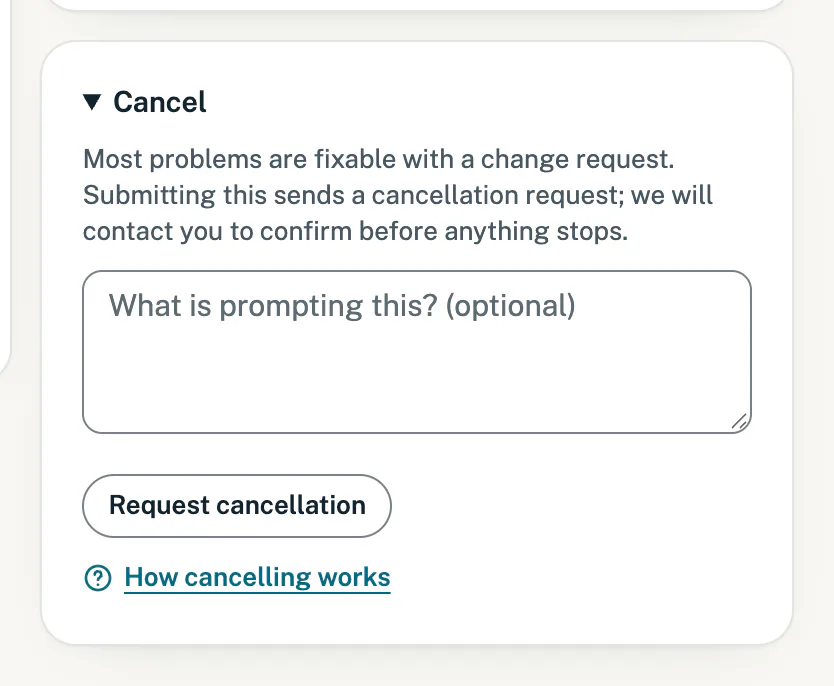
Ask us to cancel. We contact you before anything stops.
A note at the top says “We have received your cancellation request and will be in touch to sort it out. Your site stays live in the meantime.”
What happens next
- Your request is listed. It shows on Changes, under Your requests, as “Cancellation request”. It does not use your monthly change.
- We contact you to confirm before anything stops, and confirm your cancellation in writing.
- We stop your card subscription at Stitch, so no further payments are taken. Billing then shows Cancelled, and change requests that are not live yet are cancelled too.
- Your website stays live until the end of the month you have already paid for, then goes offline. If you ask within 30 days, we send you your text and photos. Our cancellation policy has the details.
Refunds
Our refund policy sets out when we refund a payment. In short:
- Your first payment: cancel within 7 days of it, and we refund it in full.
- Monthly payments after that: the rest of the month is not refunded. Your service carries on until the end of the month you have paid for.
- Once-off extras, such as an extra change: refunded in full if you cancel before we start the work.
A refund goes back to the card or account you paid with. We email you when it is on its way, and your bank may take a few days to show it. Under Invoices, the payment then shows Refunded or Partly refunded.
Changed your mind?
- Before we have processed it: while your request shows Queued on Changes, tap Cancel request on it. That withdraws your cancellation request.
- After cancelling: sign in and open Billing. Under your plan, a button such as Start Local Business again lets you add your card on Stitch’s secure page and pay the first month. If you cannot sign in any more, contact us.
Good to know
- Your domain stays yours. A .co.za included in your plan is renewed at no cost only while you are subscribed. We remind you before its next renewal and move it to the registrar of your choice.
- Email accounts included in your plan stay active until the end of your last paid month, and we help you move them to another provider.
- Changes paused? You can still ask to cancel while website changes are paused.
- On the plan with email accounts? You can move back to Local Business instead of cancelling. See Upgrade your plan.
Still stuck?
Message us on WhatsApp or send us an email. Tell us your business name, the page you were on and what you tried, and we take it from there.