
Your website and enquiries
Your dashboard: My site
Your live address, how to share it, and your enquiry numbers at a glance.
My site is the first page you see when you sign in to your portal. It shows where your website lives, gives you quick ways to share it, and counts the enquiries it brings in.
Before your website is live: what happens next
Until your website is live, My site says Welcome and shows What happens next: the four steps from paying to a live website. Steps that are done are ticked, and the one you are at is marked Now.
- Paid. Until your first payment comes through, this step says Pay your first month, with a Go to Billing button.
- We build your preview. Usually within a few days.
- You check it and ask for changes. Look through it on your phone and on a computer, and reply to tell us what you would like changed. Nothing goes live until you approve it.
- Your site goes live.
Your enquiry numbers, the card with your address, and Recent enquiries appear once there is something to show in them. Anything we still need from you is listed with a Send it button, as always. See Send us what we still need.
Your status and live address
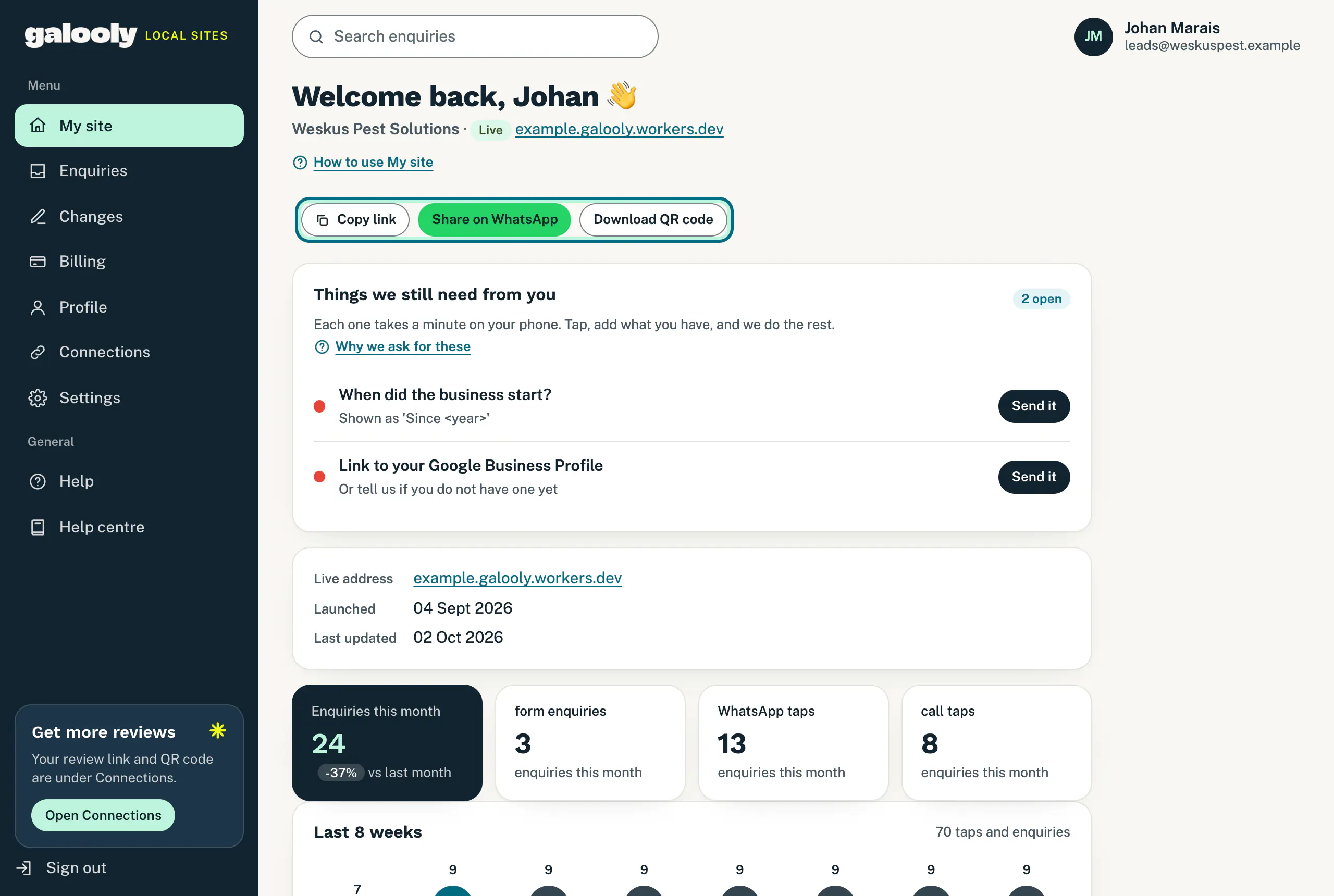
Once your website is live, My site says Welcome back. Under it you see your business name, a status label and your website’s address. The label tells you where things stand, for example Live.
Until your own domain is connected, your website runs on a free temporary address from us. Once your domain is live, My site shows your own address instead. See Connect your own domain.
Further down, a card lists your Live address, the day your website Launched and when it was Last updated.
Share your website
These buttons sit under your address once your website has one:
- Copy link copies your address, ready to paste into an email, a Facebook post or your email signature. The button says Copied for a moment.
- Share on WhatsApp opens WhatsApp with “Here is our website:” and your link already typed. Choose who to send it to.
- Download QR code opens your WhatsApp QR code as a picture. Scanning it opens a WhatsApp chat with your business, not your website. Save it and print it on flyers, invoices or your vehicle. On a phone, press and hold the picture to save it.
Your enquiry numbers
- Enquiries this month adds up everything since the 1st of the month: form enquiries, WhatsApp taps and call taps. Beside it is the change compared with last month.
- form enquiries counts the forms customers sent from your website. Each one is waiting for you on Enquiries.
- WhatsApp taps and call taps count how often someone tapped the WhatsApp or call button on your website. The chat or call goes straight to your phone, so we count the tap but never see the conversation.
- Last 8 weeks shows one bar per week, with this week on the right, so you can see the trend.
Because the three are counted separately, you can see which way your customers prefer to reach you.
Recent enquiries
At the bottom are your five newest form enquiries, with a count of the new ones. Tap a name to open that enquiry, or tap See all enquiries. How to reply and keep track: Follow up your enquiries.
On a phone
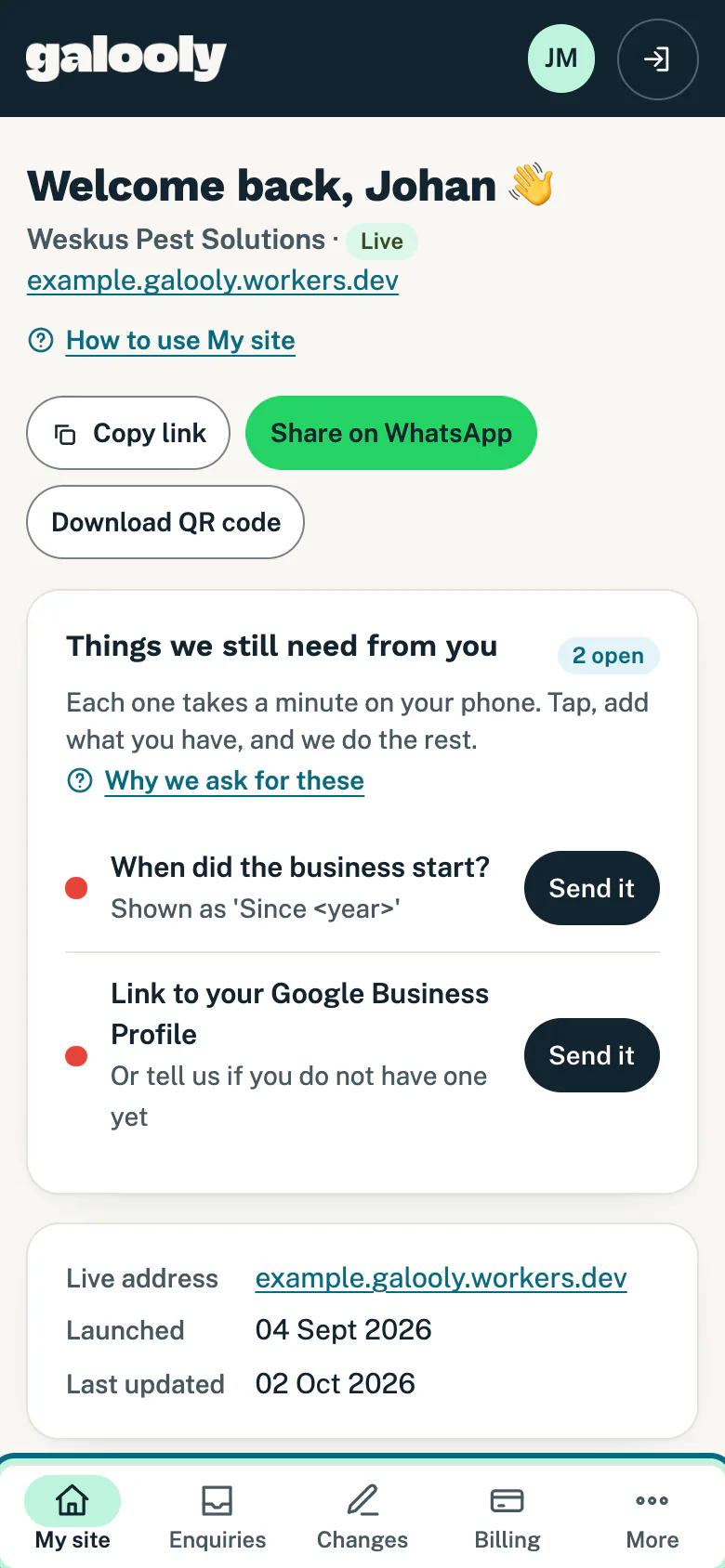
The bar at the bottom of the screen holds My site, Enquiries, Changes and Billing. Tap More for Profile, Connections, Settings and Help. A tour of every page: Find your way around the portal.
Good to know
- No share buttons? Your website does not have an address yet. The buttons appear as soon as it does.
- A list headed Things we still need from you? It asks for the details that make your website more convincing, like a photo of you. See Send us what we still need.
- A card headed Your domain? It shows while your own domain is being connected, with the two nameservers to set where you registered it and a Copy instructions button. See Connect your own domain. If we registered or transferred the domain for you, the card says we are connecting it and there is nothing for you to do.
- No enquiries yet? Share your website on WhatsApp and add the link to your Google Business Profile. Enquiries land here and in your email.
Still stuck?
Message us on WhatsApp or send us an email. Tell us your business name, the page you were on and what you tried, and we take it from there.