
Billing
Upgrade your plan
Move to the plan with email accounts, and what you pay for the rest of the month.
On Local Business and want email addresses on your own domain? You can upgrade to Local Business + 5 Email Accounts from Billing. This guide shows what you pay and what happens next.
Compare the plans
- Local Business includes your website, hosting, local SEO, your Google setup and 1 website change every month.
- Local Business + 5 Email Accounts includes everything in Local Business, plus 5 email accounts on your own domain.
The pricing page shows both plans side by side. In your portal, the navy Upgrade to card on Billing, beside your plan, shows the plan with email accounts, its monthly price and what it adds.
Upgrade by card
-
Open Billing. On a computer, it is in the menu on the left. On a phone, tap Billing in the bar at the bottom.
-
Read the line under Upgrade now, for example “By card: R100 now for the rest of this cycle, then R399 per month from 16 November.”
- Now: the difference between your current monthly price and the new one, for the rest of the month you have already paid for. It is the full difference, however many days are left.
- Then: the new monthly price, from your next billing date. Your payment day stays the same.
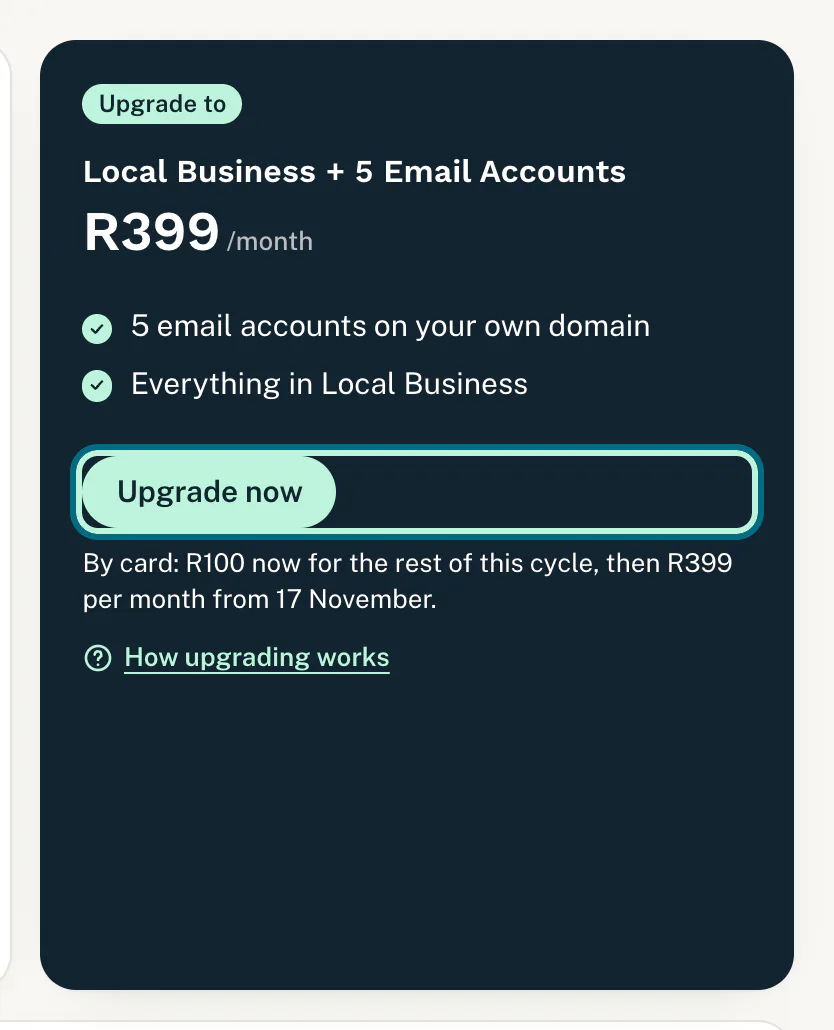
Upgrade to the plan with email accounts. -
Tap Upgrade now. Stitch’s secure page opens.
-
Add your card and pay. It can be the card you use now.
-
Check Billing. Stitch brings you back, and once the payment is confirmed your plan card shows Local Business + 5 Email Accounts. We email you a receipt, and the invoice is under Invoices.
The upgrade starts a new card subscription at the new price. Once your payment goes through, we stop the old one at Stitch.
Next, ask us to set up your email: see Set up email on your domain.
Upgrade when you pay by EFT
- Open Billing and tap Upgrade now on the Upgrade to card.
- A note says we will switch you to Local Business + 5 Email Accounts and confirm by email. The card now shows Upgrade requested.
Your request also shows on Changes, under Your requests. It does not use your monthly change.
Not paid yet, or cancelled
If you have not paid your first month yet, or your subscription is cancelled, the card shows Start on this plan instead, with what you pay by card underneath. Tap it to pay for the plan with email accounts on Stitch’s secure page.
Moving to a cheaper plan
There is no button for moving down. To go from Local Business + 5 Email Accounts back to Local Business, contact us and we will change it for you. See Contact support.
Good to know
- Email needs your own domain. If yours is not connected yet, see Connect your own domain.
- Not in the last day before a payment: you cannot upgrade by card while your next monthly payment is less than a day away. The card says “Your next monthly payment is due within a day. Please upgrade once it has gone through.”
- Your monthly change stays the same: both plans include 1 website change every month.
- No Upgrade to card? Your plan already includes email accounts.
If something goes wrong
- “Please update your card first. Then you can upgrade here.” A card payment is failing. Sort that out first: see When a card payment fails.
- “Your last monthly payment has not gone through yet.” Pay that month first, then upgrade.
- “Please contact us to upgrade.” The upgrade cannot be set up from the portal right now, so contact us and we will help.
- Billing says “If you completed the payment, it shows here within a minute.” Wait a minute and reload the page. If you cancelled on Stitch’s page, nothing was charged and you can try again.
Still stuck?
Message us on WhatsApp or send us an email. Tell us your business name, the page you were on and what you tried, and we take it from there.