
Your website and enquiries
Check what your website shows
Your profile lists the details on your website, with a quick way to change each one.
Profile shows the details your website shows, so you can check them in one place. You do not edit them here directly: each button opens a request that we apply for you, so nothing on your website changes by accident.
What Profile shows
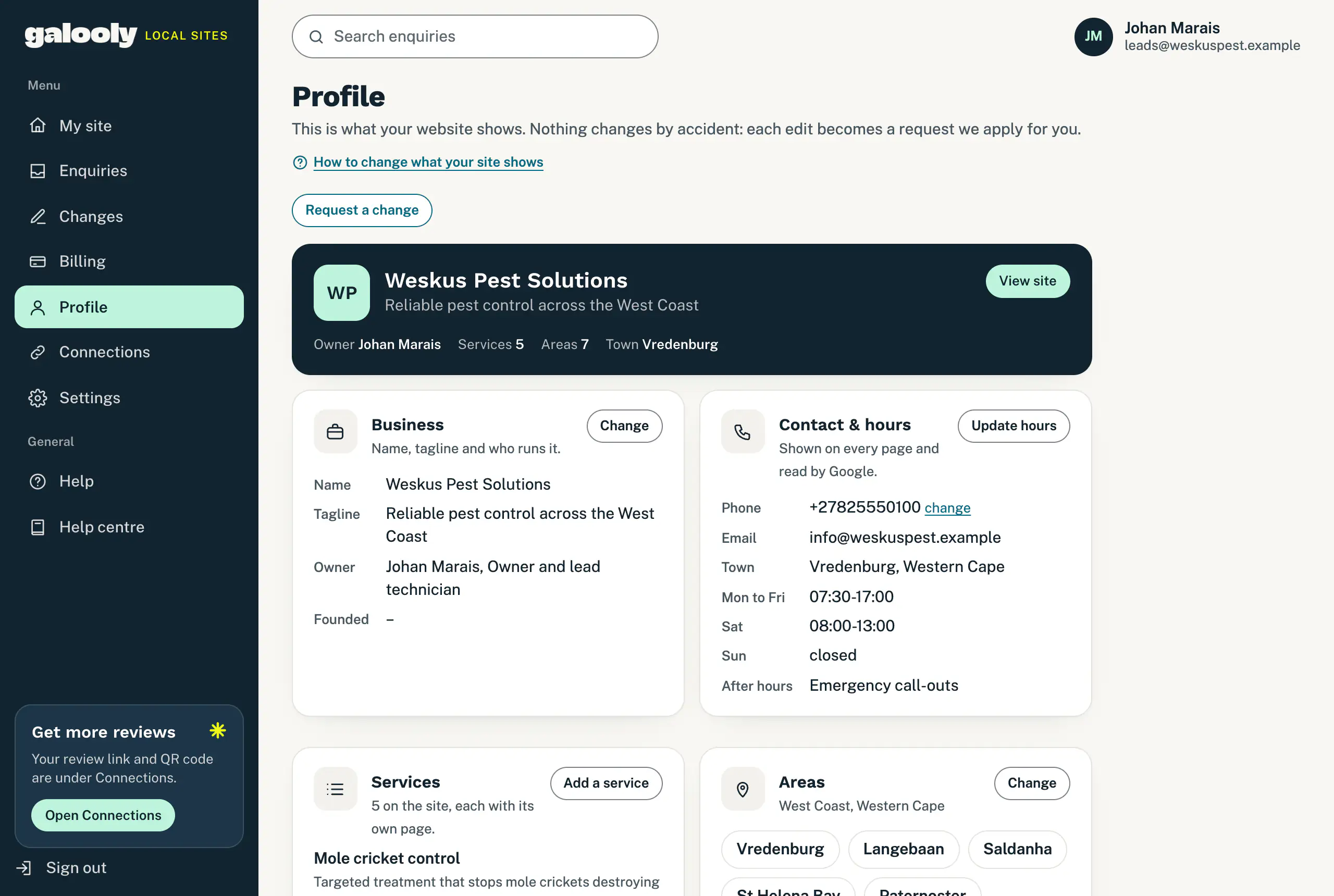
- The top card: your business name and tagline, who runs it, how many services and areas your website lists, and your town. View site opens your website.
- Business: your name, tagline, owner, and the year you started (Founded).
- Contact & hours: your phone number, email address, town and opening hours, plus After hours if you do emergency call-outs. These show on every page of your website, and Google reads them.
- Services: each service on your website. Every one has its own page.
- Areas: your region and the towns you serve.
- WhatsApp & Google: your WhatsApp number and links to your Google profile, Facebook and Instagram. You manage these under Connections.
- Photos: a reminder that real photos of you and your work do more for enquiries than anything else on the site.
A dash means we do not have that detail yet.
Ask for a change
- Tap the button beside the part you want changed:
- Change on Business opens a request titled “Update business details”.
- Update hours opens the hours form, filled in with your current hours.
- change beside your phone number opens Change phone number.
- Add a service opens Add a service.
- Change on Areas opens a request titled “Update service areas”.
- Add photos opens Add photos.
- Connections takes you to Connections, for WhatsApp, Google and your social links.
- For anything else, tap Request a change at the top.
- Fill in the form on the Changes page. Say exactly what should change, and attach anything that helps.
- Tap Queue change.
We schedule it, apply it and email you when it is live. Profile shows the new details once the change is on your website. To follow it along the way, see Follow your change requests.
Good to know
- These are website changes. Each one counts towards your monthly changes once we schedule it. See Your monthly changes and fast-track.
- Missing your name or the year you started? If My site asks for them, send them from there instead: those answers do not use your monthly changes. See Send us what we still need.
- “Not synced yet” means your profile has not come through yet. It appears after the next update to your website.
- The email address here is the one your website shows. Enquiry alerts go to the addresses under Settings: see Choose where enquiries go.
Still stuck?
Message us on WhatsApp or send us an email. Tell us your business name, the page you were on and what you tried, and we take it from there.